When will my tickets be available in the app?
Why do I need to download an app to enter the show?
What if I don’t have a smartphone?
Can I add my tickets to my phone's wallet?
How do I get into the venue on event day?
What do I need to do before the event?
Can I transfer my tickets to someone else?
How to download your Mobile ID Tickets
FAQs
When will my tickets be available in the app?
We aim for tickets to be available 14 days before your scheduled performance, if you book within 14 days of a show, please allow up until 3 days before the show for your order details and tickets to appear.
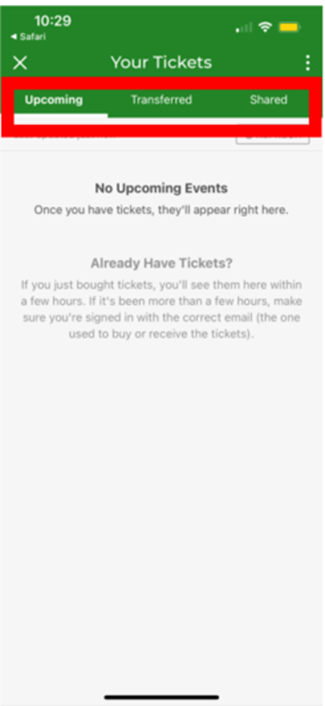
Please note: Our system is not digitally linked to the app and order details & tickets are uploaded manually prior to the event, therefore your order will not appear as an 'upcoming event' until the tickets are made available.
The OVO Arena Wembley App
In advance of attending your performance of Disney on Ice at the OVO Arena Wembley, You will need to download OVO Arena Wembley/AXS app to access your tickets. If you don't already have an account with AXS, be sure to sign up with the same email address you used to place this order.
Full details can also be found on the OVO Arena's app site: https://www.ovoarena.co.uk/your-visit/venue-app
How do I download the app?
What are the links for the The OVO Wembley app?
• Apple: https://apps.apple.com/gb/app/the-sse-arena-wembley/id1290133388
• Play Store: https://play.google.com/store/apps/details?id=com.livestyled.ssewembley
Why do I need to download an app to enter the show?
The technology provided through the venue app offers a secure and trusted ticketing experience. When you use the venue app, you receive a revolving QR code which is not just a ticket - It is your event identity and works to eliminate ticket fraud and theft. This code allows you to enter events with a simple, yet secure scan and works with or without internet connection.
What if I don’t have a smartphone?
If any other member of your party attending the event has a smartphone you can arrange to transfer tickets to them. If no one in the party attending the event has a smart phone, please visit the box office at the venue on show night
Can I add my tickets to my phone's wallet?
Due the nature of the ticket and its barcode that changes every 59 seconds, it needs to be in The OVO Arena Wembley app rather than a mobile wallet.
How do I get into the venue on event day?
With Mobile ID, your one-of-a-kind barcode gets you into the venue quickly. Please have your Mobile ID barcode displayed on the venue app when you approach the venue entrance, Wi-Fi is available at all entrances, but your ticket will work without Wi-Fi in place. Please note that a screenshot of your Mobile ID will not work. For security purposes, the barcode changes every 59 seconds.
What do I need to do before the event?
- Ensure you have the latest version of the app installed
- Have your phones date and time settings set to automatic
- Screen is set to maximum brightness.
- Show your Mobile ID ticket to the Guest Services Representative who will scan it and admit you into the venue.
Can I transfer my tickets to someone else?
Yes, you can, you will need to register for an account with AXS in order to send a ticket to someone else. If the person receiving the tickets does not have an AXS account, they will receive an email informing them they have been sent tickets and to create an account to view them in The OVO Wembley app.
See the instructions below for details on how to do this.
How to download your Mobile ID Tickets
Once you have downloaded the app, open it and you will be presented with the page
If you do not have an account already registered under the same email address that you placed your order with, you will need to register as a new user.
Fill in the relevant details. Once you have completed this step, you will be required to verify your email address, head to your inbox and locate the verification email (don't forget to check junk mail folders too!) and click the green 'Verify' button.
Once you're all signed in, you may see a notifications pop up, select your preferred option (this can be changed later in your phone's settings if needed) and you will then see the 'Access your tickets' option in the app,
Once you've clicked this, it may prompt an AXS registration page. Register your email and a password (or sign in if you already have an account with the same email address). Once this signs you in, you should then see your tickets appear in the Wallet tab via the 'My Tickets' option.
Your tickets will appear as a mobile ID like this, if you try screenshotting your tickets, you'll be reminded that screenshots are not usable due to the fact that the QR code refreshes every 59 seconds.
Show your Mobile ID ticket to the Guest Services Representative who will scan it and admit you into the venue.
What if I want to transfer my tickets to someone else that is attending?
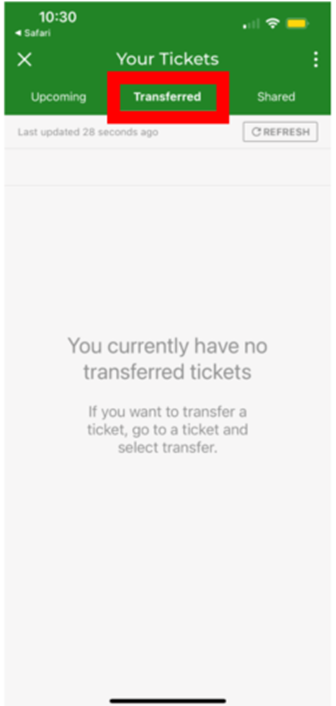
In the app locate the tickets you want to transfer, and select the 'transfer' button. input the details of the person you are transferring the tickets to. If the person receiving the tickets does not have an AXS account, they will receive an email informing them they have been sent tickets and to create an account to view them in The OVO Wembley app.
Once transferred, these will then appear in the 'Transferred' menu in the app.
Help - I'm still having problems!
If you have tried all these steps and are still having problems, we recommend trying to log in with the same details directly in the AXS App (as this is the system/account the OVO Arena app synchronises to).
You can download the AXS App here:
Apple: https://apps.apple.com/gb/app/axs-tickets/id679805463
Play Store: https://play.google.com/store/search?q=axs+tickets&c=apps&hl=en_GB
Details about accessing your tickets via AXS can be found here: I can't see my tickets in the AXS app
If you are still unable to access your tickets via the AXS app and it is within 3 days of your performance, please contact the venue for further assistance.